

If you’re building applications, you already know this: feedback is priceless. Sure, gold is shiny, but when it comes to improving your app, useful feedback from your users is the real treasure. Luckily, Mendix gives us a nifty tool to collect it: Mini Surveys.
In this blog, I’ll show you how to set one up in your app in just 4 easy steps. Plus, I’ll share my own experience with a little life hack that makes the functionality more flexible.
Author of the blog:

Chelsea Veenstra
At the start of May 2024, Chelsea joined our ranks, and we couldn’t be more thrilled. With pride, we announce that Chelsea is the sole Mendix Certified Expert in Australia, bringing unparalleled expertise to our projects.
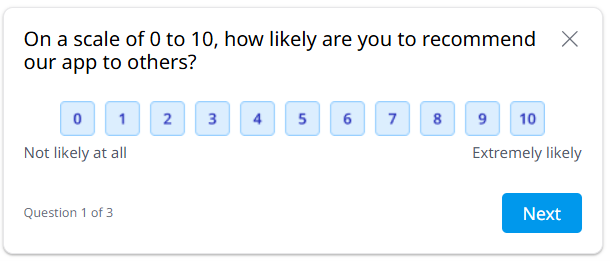
What are Mini Surveys?
Mini Surveys are short, in-app surveys that pop up for your users. They’re quick, easy, and barely intrusive. Perfect for measuring satisfaction, usability, or just checking whether that new feature you released is a hit or a flop.
Why I’m so excited about this feature:
• Direct insights from your users
• Easy to manage – no extra survey tools needed, it’s baked right into Mendix
• Business-user friendly – results are right there in the Developer Portal, so product owners and business stakeholders can see the treasure without digging through databases
How to implement Mini Surveys
Getting started is simple:
1. Create a survey in the Developer Portal.
2. Download the MiniSurvey module from the Marketplace.
3. Generate an API Key for your project in the developer portal and set that as the “APIKEY_APPINSIGHTS” constant in your application
4. Place the MiniSurvey widget on the page where you want it to pop up for your users.
C’est ça!
A small plot twist…
Inside the MiniSurvey Module, you’ll find an example microflow that suggests you can pass in your own SurveyID and show that specific survey on a page. In theory, this would be amazing: you could point your test environment to a test survey, and your production environment to the “real” survey, keeping your official results nice and clean.
But here’s the rub: I haven’t managed to get that working yet.
So here’s my (like we say in Dutch) “tip from flip”:
Control it with a constant, e.g. Enable MiniSurvey and place the widget in a container using this constant for conditional visibility. This lets you turn surveys on/off per environment, super handy if you only want feedback coming in from production. And hey, if you have cracked the code and got the SurveyID approach working: hit your gurl up, because I’d love to know how you did it!
Final Thoughts
Mini Surveys might not be literal gold, but they’re close — they give you real, actionable insights straight from your users. And that’s the kind of treasure that makes your application better with every iteration.
Until the SurveyID option is reliable, you may have to put up with a little less flexibility. But even so, Mini Surveys are worth their weight in… well, you get the point.
Chelsea Veenstra
More Mendix tips

Online-First, Offline-Smart: 4 Lessons learned from a Hybrid Mendix App
Articles Online-First, Offline-Smart 4 Lessons learned from a Hybrid Mendix App In this blog Lesson 1: Architectural Foundation: Keep It Light Lesson 2: Automating Sync Between Online and Offline Lesson 3: Switching Profiles: Online ↔ Offline...

Why Low-Code (Mendix) isn’t a Japanese knife, and that’s a good thing
Articles Why Low-Code (Mendix) isn’t a Japanese knife and that’s a good thing In this blog Do you always need the best of the best? The problem with the "Japanese Knife" approach Low-code is more like a German steel knife AI and low-code: a...
Embracing Mistakes in Mendix Development: A Beginner’s Guide to Undoing “Uh-Oh” Moments
Articles Embracing Mistakes in Mendix Development A Beginner’s Guide to Undoing “Uh-Oh” Moments In this blog Practical Tips for Undoing Mistakes in Mendix Building a Culture of Growth Learn more More mendix tips Embarking on your journey as a...