
7 Approaches to Replace Legacy Software 

8 signs of legacy software

Reading time: 3 minutes 

What You’ll Learn 

  • The seven ways to deal with legacy software 
  • When to choose which approach to replace your legacy software 
  • A diagram with our generic approach

Thinking Alongside Our Clients: Why Legacy Replacement Is Never One-Size-Fits-All


At CAPE Digital Solutions, we work with organisations facing legacy software challenges every day. The reality? There’s no single right way to replace legacy systems. Some are stable but expensive; others are risky, deeply embedded, or simply holding the business back. The best approach depends on your context, priorities, and appetite for change.  

Context Matters

Below are seven generic approaches to legacy replacement. These aren’t prescriptive, they’re starting points for a conversation. In practice, the right solution is often a combination, tailored to your situation. We’ve created a simplified diagram to help visualise these options.

Remember: understanding why you want to move away from your current system is key, your goals will shape which approach is best. 
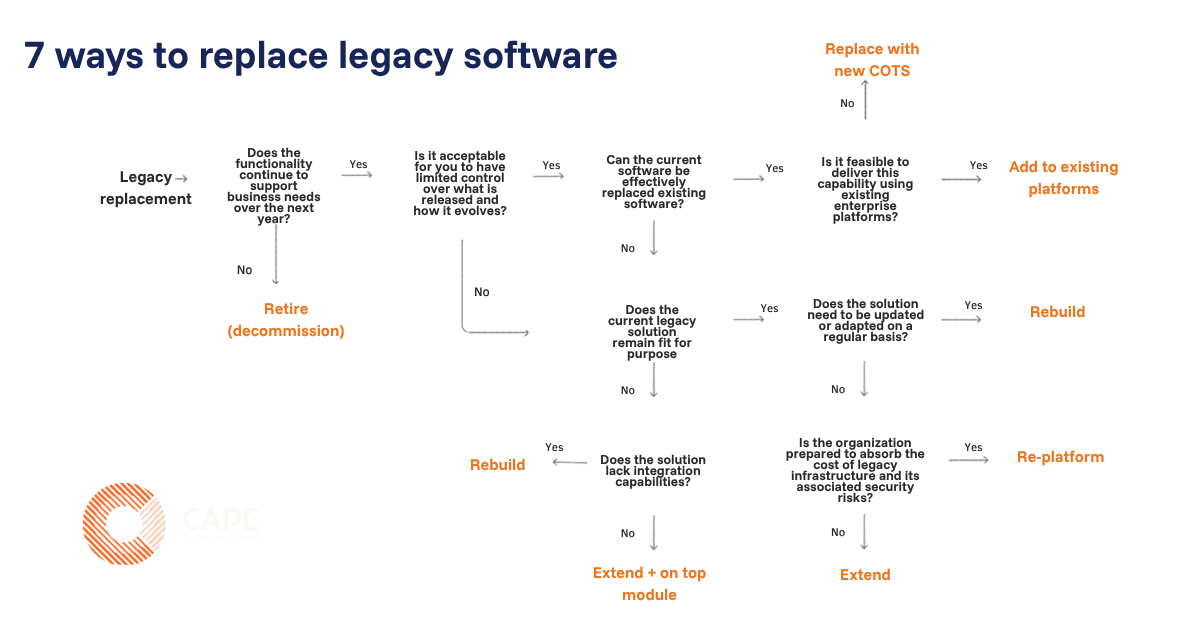
7 ways of legacy replacement

1. Replace with New COTS (Commercial Off-The-Shelf)

What it is: Retire the legacy system and adopt a standard product (e.g. Salesforce, SAP, ServiceNow, Monday.com, ERP, CRM solutions). 

When it works well: 

  • Processes are fairly standard 
  • Speed of implementation is important 
  • Differentiation is not required 

Pros: 

  • Fast value 
  • Vendor-managed upgrades 
  • Lower long-term maintenance 

Cons: 

  • Limited flexibility 
  • Risk of heavy customisation 
  • Business must adapt to the tool 

2. Migrate Features to Existing Platforms (with Customisation)

What it is: Move features from the legacy system to platforms already in use within your organisation, adding custom code or configuration as needed. This often allows you to decommission redundant features and consolidate systems.

When it works well: 

  • Your organisation has invested in modern platforms 
  • There’s overlap between legacy and current capabilities 
  • You want to reduce system sprawl 

Pros: 

  • Leverages existing investments 
  • Reduces duplication 
  • Streamlines support and maintenance 

Cons: 

  • May require significant customisation 
  • Integration complexity 
  • Potential for feature gaps 

3. Retire (Decommission)

What it is: Switch off the system completely. This is the simplest approach—if you can accept that the features are no longer needed. 

When it works well: 

  • Usage analysis shows the system is barely used 
  • Functionality is duplicated elsewhere 

Pros: 

  • Immediate cost savings 
  • Reduces complexity 

Cons: 

  • Needs strong stakeholder validation 
  • Data archival and compliance considerations 
  • Decision risk—someone must own the call 

Tip: We sometimes recommend a temporary shutdown to test real-world impact. Redirect users to IT for support and monitor feedback. Risky, but revealing! 

4. Extend (Minimise Investment, Manage Risk)

What it is: Intentionally keep the legacy system as-is, managing risk and cost. Often used when a replacement is planned but not yet ready, or when a feature is only needed for a limited time. 

When it works well: 

  • Replacement cost is higher than the business value 
  • The system is stable and low-risk 

Pros: 

  • Buys time for transition 
  • Minimal investment 

Cons: 

  • Technical debt persists 
  • Vulnerability if knowledge is lost 
  • Risk increases over time 

In practice, we see this approach used when a project is underway to replace the system, or compliance requires a feature for another year. It’s a way to buy time, but beware: vulnerabilities can grow if the system is left too long without know-how or support. 

    5. Replatform (Lift & Shift) 

    What it is: Move the legacy system to a modern environment (often cloud) without changing its core functionality. Minimal code changes. 

    When it works well: 

    • The system works, but maintenance or infrastructure costs are high 
    • Security or compliance risks are increasing 

    Pros: 

    • Quick win 
    • Improves stability and scalability 
    • Reduces infrastructure cost 

    Cons: 

    • Does not fix functional or UX issues 
    • Technical debt often remains 
    • Still hard to change the code, therefore important there is limited change required.  

    We see this approach when business or security risk is too high to wait for a full rebuild. It’s a fast way to stabilise costs and reduce risk, but doesn’t solve deeper functional challenges. 

    6. Rebuild (Full Replacement)

    What it is: Replace the legacy system entirely with a modern, fit-for-purpose solution. 

    When it works well: 

    • The system is expensive, fragile, or actively holding the business back 
    • Innovation and integration are priorities 

    Pros: 

    • Eliminates technical debt 
    • Improves user experience and productivity 
    • Enables faster innovation 

    Cons: 

    • Highest upfront investment 
    • Requires significant resources 
    • Longer delivery timeline 

    Rebuilding is often the strongest long-term ROI, especially for systems critical to core operations, and change is constantly required. But it’s a big commitment—ask what custom software suits best before you start. Always make a business case and create multiple scnearios to determine what works best for you.  

    7. Extend the Core and Add a Flexible Layer

    What it is: Keep the stable legacy core, but add a modern, flexible layer around it to extend functionality, improve user experience, and enable faster change. New capabilities are built outside the core and integrated cleanly. 

    When it works well: 

    • The legacy system is stable but difficult to change 
    • Core functionality still works reliably 
    • A full replacement is too risky or costly in the short term 

    Pros: 

    • Preserves a proven core 
    • Reduces risk compared to a full rebuild 
    • Enables faster innovation 
    • Supports gradual modernisation 

    Cons: 

    • Legacy system remains part of the landscape 
    • Integration and governance are critical 
    • Technical debt is reduced gradually 

    This approach supports controlled evolution. Over time, functionality can be shifted away from the legacy core as strategy, budget, and priorities allow. It’s less disruptive, but requires strong architectural discipline and clear ownership across both layers. 

    Want to know more about Legacy Software?

    If you’d like to understand what legacy software really means (and why businesses still rely on it) read our main article that explains the foundations. 

    Choosing the Right Approach 

    You can apply different strategies to different systems. The right choice depends on: 

    • Business criticality 
    • Risk and compliance exposure 
    • Cost of maintenance vs replacement 
    • Speed of change required 

    A structured assessment helps identify which systems should be migrated, extended, or rebuilt first. 

    Unsure which approach fits your systems? A quick legacy software assessment can reveal where migration, extension, or rebuilding will deliver the fastest ROI. 

    Contact us to explore a smarter, lower-risk path to modernisation. Schedule a free consultation with our experts. 

    Harmjan-CAPE digital solutions

    Harmjan Oonk